

Fantasy Basketball Lineups: Slots, Daily vs Weekly Locks & Roster Spot Types
How fantasy basketball lineups work — every roster spot type explained, daily vs weekly lineup leagues, when players lock, injury designations, and IL spots.

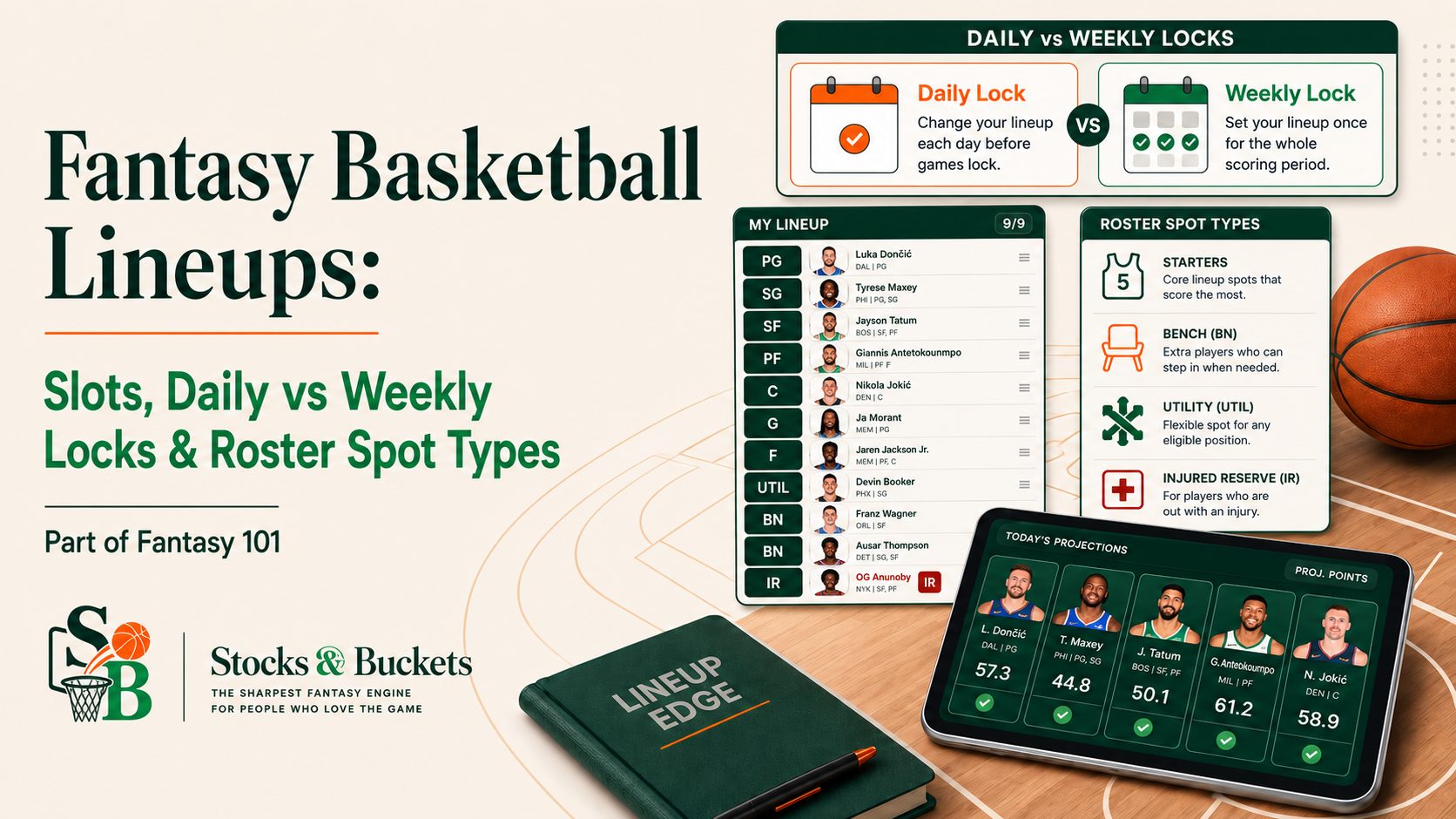
Part of Fantasy 101 — our from-scratch guide to fantasy basketball. Earlier in the series: what fantasy basketball is, how scoring works, and your first draft.
You've survived the draft and there it is: your roster, thirteen-ish names deep, staring back at you. Now comes the part nobody explains on draft night — actually running the thing. Which players score for you tonight, which don't, when your choices lock, what all those slot labels mean, and where the hurt guys go. This is the complete article on lineups and roster mechanics: read it once and nothing on your roster page will confuse you again.
The three kinds of roster spots
Every fantasy basketball roster — usually 13 players, sometimes 10 to 16 — divides into three kinds of real estate:
| Spot type | What it does | Typical count |
|---|---|---|
| Starting slots | Players whose stats count tonight (or this week) | 10 |
| Bench | Rostered and yours, but scoring nothing while seated | 3–4 |
| IL / IL+ | Holds injured players without using a roster spot | 1–3 |
The starting slots are where stats happen; the bench is your holding area (a bench player still scores zero — being rostered isn't the same as being started); and the IL is a special pen with its own rules, covered below. Platforms differ on the details — the injured slot is called IL on Yahoo and IR on ESPN, and many leagues run an IL+ variant that also accepts day-to-day injuries — but the three-part structure is universal. Your exact league shape lives in the league settings page; reading it in week one is a two-minute chore that prevents a season of small surprises.
The starting slots, position by position
The slot labels are the first vocabulary to learn:
| Slot | Who can fill it |
|---|---|
| PG / SG | Point guards / shooting guards |
| G | Any guard |
| SF / PF | Small forwards / power forwards |
| F | Any forward |
| C | Centers |
| UTIL | Anyone — your best remaining player |
A standard ten-man lineup runs PG, SG, G, SF, PF, F, C, C (or a second UTIL), plus two or three UTIL — the exact mix varies by league. Three things beginners miss:
- Position eligibility is earned, not fixed. Platforms grant a player every position he's actually appeared at enough times — so a big who splits time between the four and the five might carry PF/C and slide anywhere in your frontcourt. Eligibility also updates in-season: a few weeks of a guard running point can add PG to his card mid-year, quietly making him more useful to you.
- Multi-position players are lineup oil. Every extra position on a player's card unlocks combinations a one-position player can't — which, across a week, means more of your roster's games actually collected instead of stranded behind a logjam. When two players are close on our board, the one with the extra position tag wins ties.
- UTIL is not a junk drawer. It's where your best leftover player lives after the position slots are filled. If your UTIL is regularly outscored by someone on your bench, your lineup order needs a rethink.
Daily vs weekly lineup leagues — know which game you're playing
Before any strategy, answer one question: when does your lineup lock? It's the single biggest fork in how fantasy basketball feels to play.
| Daily leagues | Weekly leagues | |
|---|---|---|
| Lineup changes | Every day | Once — locks at the week's first tip (usually Monday) |
| Time cost | 2 minutes most nights | One honest planning session |
| Rewards | Attention — catching late injury news, playing every game | Planning — reading the week's schedule in advance |
| Punishes | Forgetting a night | A lazy Monday |
Daily leagues are the default on most platforms, and they reward the manager who shows up: every night you can swap tonight's non-players for someone with a game. Weekly leagues are more forgiving for busy people — one decision, then the week plays out — but that one decision carries real weight. You're betting every slot on a full week of games at once, so the NBA schedule (how many games each player has this week) stops being trivia and becomes the whole ballgame. Our schedule planner counts it for you.
When exactly do players lock?
"Daily" hides a second setting worth knowing cold, because it decides how you can handle late injury news:
- Game-time lock (most common): each player locks individually at his own tip-off. Until then he's movable — which means you can wait out a Questionable tag on a 10pm game even after the 7pm games have started.
- Daily lock: the whole day's lineup locks when the day's first game tips. No waiting anyone out — decisions are due by early evening.
- Weekly lock: everything locks at the week's first game and stays put through Sunday.
Same platform, different leagues, different rules — it's a commissioner setting. Find yours before your first close matchup, not during it.
Setting your lineup without losing free wins
Three rules cover most of it:
- A star on your bench scores zero. "I had 40 points sitting on my bench" is the most preventable sentence in fantasy. Learn your league's slots in week one so lineup-day decisions are mechanical, not puzzling.
- Injured players don't announce themselves. NBA availability news breaks daily — rest nights, minor knocks, sudden lineup changes. The apps flag statuses, but the flag sometimes lands an hour before tip. A pre-tip glance is the whole defense.
- Weekly leagues punish laziness harder. If your lineup locks Monday morning, the planning session isn't optional. Count games, check injury reports, and set the lineup you'd want on Thursday too — because you'll be stuck with it.
Reading the injury report like a manager
Those little letters next to a player's name are the NBA's official designations, and each has a fantasy meaning:
| Tag | What it means | How to play it |
|---|---|---|
| P — Probable | Almost certainly plays | Start him normally |
| Q — Questionable | Genuine coin-flip, resolved near tip | Have a bench plan; in game-time-lock leagues, wait it out |
| D — Doubtful | Rarely plays | Treat as Out unless news improves |
| O — Out | Guaranteed zero | Never start him — this is the free win you don't donate |
The Questionable tag is where lock rules (above) earn their keep: in a game-time-lock league you can leave a Questionable star in until his tip and pivot the moment he's ruled out; in a daily-lock league you have to decide early, so the safer play in a close matchup is often the healthy player with the certain game. One more habit: late-night West Coast games are where Questionable tags quietly become DNPs after your bedtime — if you won't be awake for the news, decide as if you won't get another chance. (Availability is also a skill you can draft and trade for — it's why games-played projections move our player values so much.)
Game limits: the cap nobody reads about
Two caps hide in league settings and ambush first-year managers:
- Season game caps (Roto/season leagues). Most season-long formats cap total games per lineup slot — 82 per slot is the standard, mirroring a real NBA schedule. Burn games carelessly in November and your best players' April games stop counting, right when the standings tighten. Pace yourself like the league leaders do: it's a budget, not a suggestion.
- Weekly move/game limits (H2H leagues). Many head-to-head leagues cap pickups per week (often 4–7), and some cap games started per week. This turns roster churn into a resource — the subject of the streaming section in the next part.
Neither cap exists in every league. But "I didn't know there was a cap" costs real titles every season, and the fix is one read of the settings page.
How IL spots work (and bench hygiene)
Most leagues include IL (injured list) slots — parking spaces for hurt players that don't consume a regular roster spot. The mechanics:
- A player becomes IL-eligible when he carries an official injury designation (Out, or the platform's IL tag). An IL+ slot, where your league runs one, also accepts day-to-day designations — check your settings.
- While he's stashed, you get his roster spot back: pick up a live body, score actual points tonight.
- When he's healthy, the platform won't let him sit there — you must move him back to the active roster or cut someone. Plan that move before the return, not the morning it happens. (Watch for the trap where a returning star's IL exit forces you to drop the exact streamer you needed that night.)
The strategy is where real weeks get won:
- Never let an IL slot sit empty while a hurt player clogs your bench. This is the most common roster leak in beginner leagues, and it costs actual games of actual stats.
- Injured stars are trade currency. A contender will pay real value in February for a star coming back in March. If your season's going sideways, stashing returning players is the sneaky-best rebuild move in fantasy.
- Check your bench for zombies weekly. Every league has three rosters carrying someone who stopped mattering in November. That spot is a streaming engine or a stash slot — never a museum.
The weekly rhythm
Everything above compresses into two habits:
- Daily (2 minutes): before the first game tips, check your lineup. Anyone injured, resting, or without a game gets swapped for someone playing tonight. Skipped nights are how close matchups get lost.
- Weekly (20 minutes, ideally Sunday or Monday): read next week's schedule, count games for your roster, and plan the moves — which feeds directly into waivers, streaming, and trades, the subject of the next part.
If you only ever do those two things, you will out-manage half your league. That's not a pep talk; it's just what the standings show by March.
Quick answers on lineups
What is the difference between daily and weekly lineups in fantasy basketball?
Daily leagues let you change starters every day; weekly leagues lock the whole lineup at the week's first tip — usually Monday — through Sunday. Daily rewards attention; weekly rewards planning; the table above has the full comparison.
When do players lock in fantasy basketball?
Depends on your league's lock type: game-time lock (each player locks at his own tip-off — most common), daily lock (whole lineup locks at the day's first game), or weekly lock (everything locks Monday). It's a league setting, and it decides how you can play Questionable tags — check it before your first close matchup.
What does UTIL mean in fantasy basketball?
UTIL (utility) is a slot any player can fill regardless of position — it's where your best remaining player starts after the position slots are set. Most standard lineups carry two or three.
How do IL spots work in fantasy basketball?
An IL slot holds a player with an official injury designation without using a regular roster spot. When he's healthy you must move him back (or drop someone). Rule of thumb: never let a hurt player clog your bench while an IL slot sits empty — stash him and pick up a live body.
What do Questionable, Doubtful, and Out mean?
The NBA's official designations: Probable usually plays, Questionable is a real coin-flip resolved near tip-off, Doubtful rarely plays, Out is a guaranteed zero. Never start an Out player; for Questionable ones, know your lock rules and keep a bench plan ready.
How often should you check your fantasy basketball team?
Two minutes before tip each game night to fix your lineup, plus one 20-minute session early in the week for the schedule ahead. That rhythm alone out-manages half a typical league.
Which league type do you play — daily or weekly lineups?
Next in Fantasy 101: the in-season playbook — how the waiver wire works, streaming the schedule, and making trades that actually help. Start from the hub: What is fantasy basketball?
New analysis, every week.
Our sharpest reads and the views we'd act on, plus early access to the tools.
Join us